The trading decision lifecycle: from idea to closed trade.
A trade is not one decision. It is a chain of them: approve, accept, execute, manage, close. Each step has its own question, and skipping one is where discipline leaks.
Most traders treat a trade as a single moment: the click on buy. In reality it is a sequence of decisions over days or weeks, and each can go wrong on its own.
Naming the stages makes them checkable. This article walks through them in order and shows how to manage a position without breaking its plan.
The problem: one “yes” stands in for four
“The setup is approved” quietly means “I can buy”. But an approved plan can be too old, invalidated by price, blocked by a risk limit or simply unconfirmed.
The failure is a good decision acted on at the wrong stage.
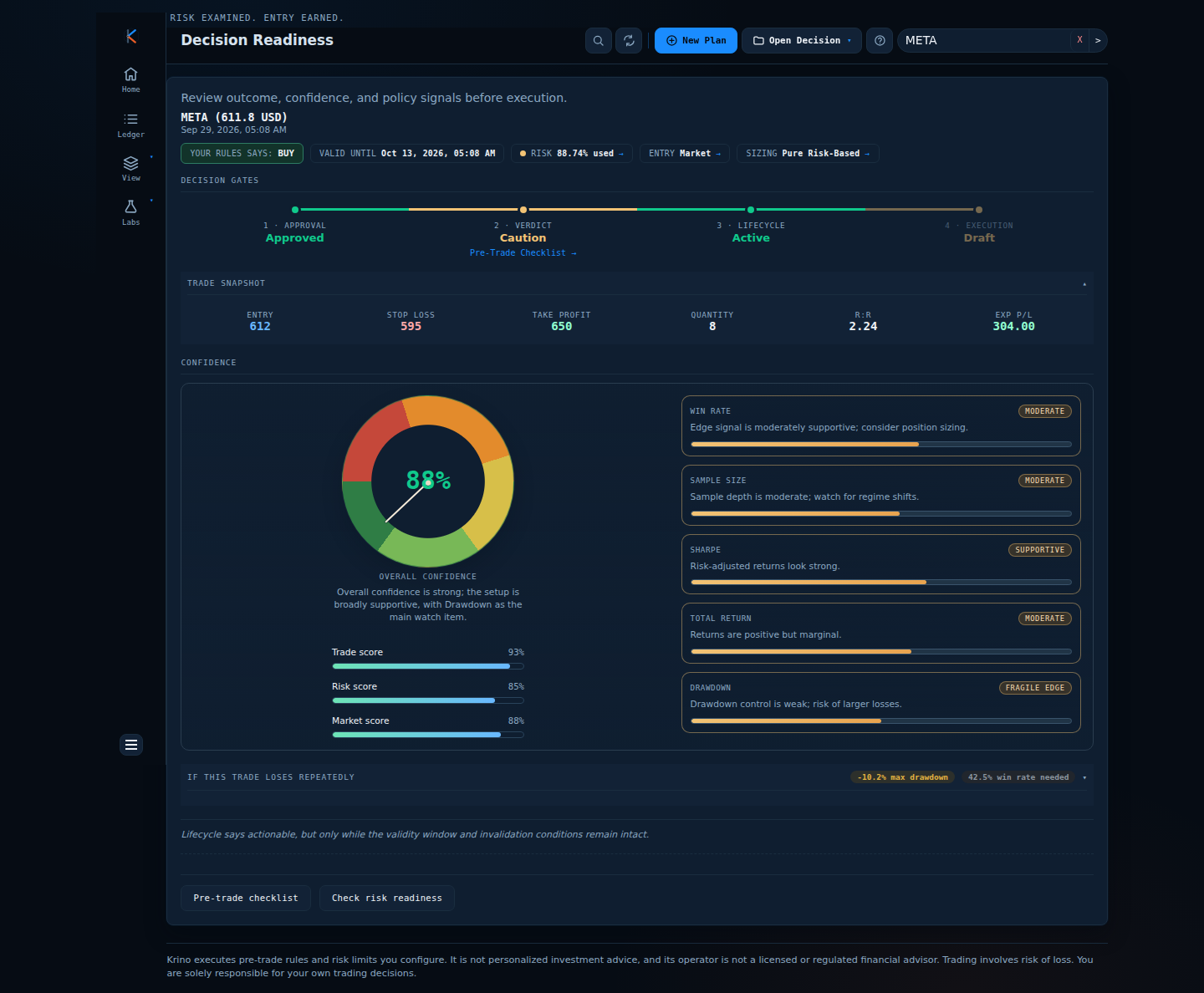
Key concept: four gates, in order
| 1. Approval | Do your rules say yes: Approved, Allowed with Caution or Rejected? |
| 2. Verdict | After the pre-trade checks (stop, capital, size, risk acceptance), is it fit to act on? |
| 3. Lifecycle | Is the plan still valid: Active, Expired or Invalidated? |
| 4. Execution | Where is the trade: Draft, Accepted, Executing or Completed? |
Lifecycle status is resolved by strict precedence, first match wins:
- Rejected if the decision was rejected, even if a plan exists.
- Draft if there is no plan.
- Invalidated if any invalidation trigger has fired, even when the plan has also expired.
- Expired if no trigger fired but the validity window has ended.
- Active otherwise.
Act only when approval, verdict and lifecycle all agree, and the risk budget has room. A plan that passed once has to pass again if time or price has moved.
Worked example: a META plan, day by day
- Day 0, plan created. Approved, 88% confidence, entry 612, stop 595, target 650, 8 shares. Verdict: Caution until the checklist is confirmed. Lifecycle: Active, valid until 13 Oct. Execution: Draft.
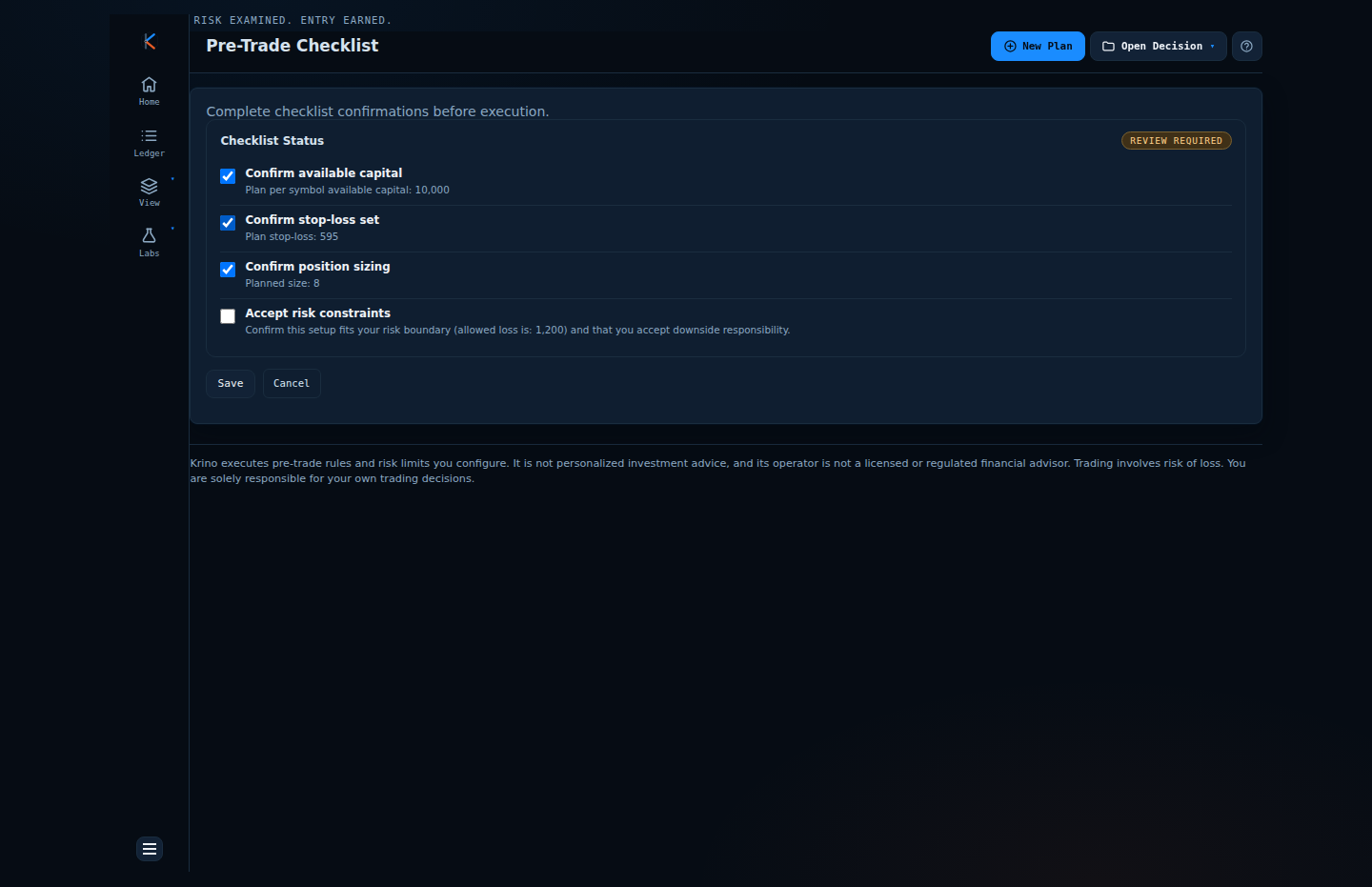
- Pre-trade checklist. Stop, capital, size and risk acceptance confirmed. The verdict moves from Caution to Fit.
- Accepted. The plan is committed. Execution status becomes Accepted, with an order waiting.
- Executing. The fill is recorded in the ledger and linked to the decision. Now the plan is a position.
- Managing. Price moves in your favour. The plan suggests raising the stop to break-even. Record the revision; don't rewrite the story.
- Completed. Target, stop or a manual exit closes it, and the realised P&L is booked.
Managing an open position: move the stop, then take profit
MSFT, 10 shares at 415. The app suggests raising the stop to break-even; the revision is recorded, risk is freed, and days later a scale-out is recorded and compared against the original plan.
Illustrative prices and staged data; captions are added to the recording.
Comparison: lifecycle states and what to do
| State | Meaning | Right response |
|---|---|---|
| Active | No triggers fired, inside the validity window | Actionable, if the risk budget has room |
| Expired | Validity window has ended | Re-evaluate with fresh data; do not trade the old plan |
| Invalidated | A condition that voided the plan has occurred | Stand down; the setup no longer holds |
| Rejected | Rules said no | Read the reasons; do not override to fit |
| Draft | No plan yet | Build the plan first |
Common mistakes
- Trading an old approval. Prices move. Re-check validity before acting on a plan from last week.
- Managing a position by editing the story. Moving a stop without recording it makes the review useless.
- Adding to a winner under the original approval. An add is a new decision with its own risk and sizing.
- Skipping the checklist. It is the stage where “Caution” becomes “Fit” deliberately, not by default.
A framework you can use tomorrow
- Write the plan with an explicit validity window and the conditions that would void it.
- Before acting, check all four gates: approval, verdict, lifecycle, execution.
- Record the fill against the plan, with price and time.
- Treat every change (stop moved, size added) as a recorded revision or a new plan.
- Close the loop: compare the end state with the original plan.
How Krino helps
Decision Readiness shows the four gates on one screen. Lifecycle is computed by the strict precedence above, and Re-evaluate re-checks it against current conditions. The pre-trade checklist is the explicit step between Caution and Fit.
Every plan lives in the Decision Register with its history; the Ledger links fills to decisions; and Decision Compare shows exactly what changed between the original plan and a later revision, so managing a trade stays distinguishable from changing it.
Walk a plan through all four gates.
The demo opens a META plan at the checklist step, with each gate marked. No signup, no email, no card.
Quick start checklist
- Give every plan a validity window.
- Write down what would invalidate it.
- Check approval, verdict, lifecycle and risk before each action.
- Record fills and plan changes the moment they happen.
- Treat adds as new decisions.
- Compare the closed trade with its original plan.
The question that actually matters
Instead of asking “was this trade approved?” ask “is it still valid, and what stage is it in?” Take one open position and name its stage today. If you cannot, you have found the first thing to fix.
Give your next trade all four gates.
Plan it in the demo and see where it stops. No signup needed.
Krino executes rules and risk limits you configure. It is not personalized investment advice. Trading involves risk of loss. You are solely responsible for your own trading decisions. The worked examples in this article use illustrative prices and demo data, not a recommendation or real market data.