What-if simulations: stress-test the trade before you risk money.
Your plan assumes a clean fill at the planned price. Real markets rarely cooperate. Ask what happens at a worse fill, with fees, and with the stop hit, before you place the order.
Most trade plans assume the best case: the entry you wanted, a stop that works as drawn, zero fees. Then you get a worse fill, and the trade you approved is no longer the trade you are in.
A what-if simulation answers one question before the order: how bad can this plan get, and does it still make sense when it does?
The problem: you only test the plan you hoped for
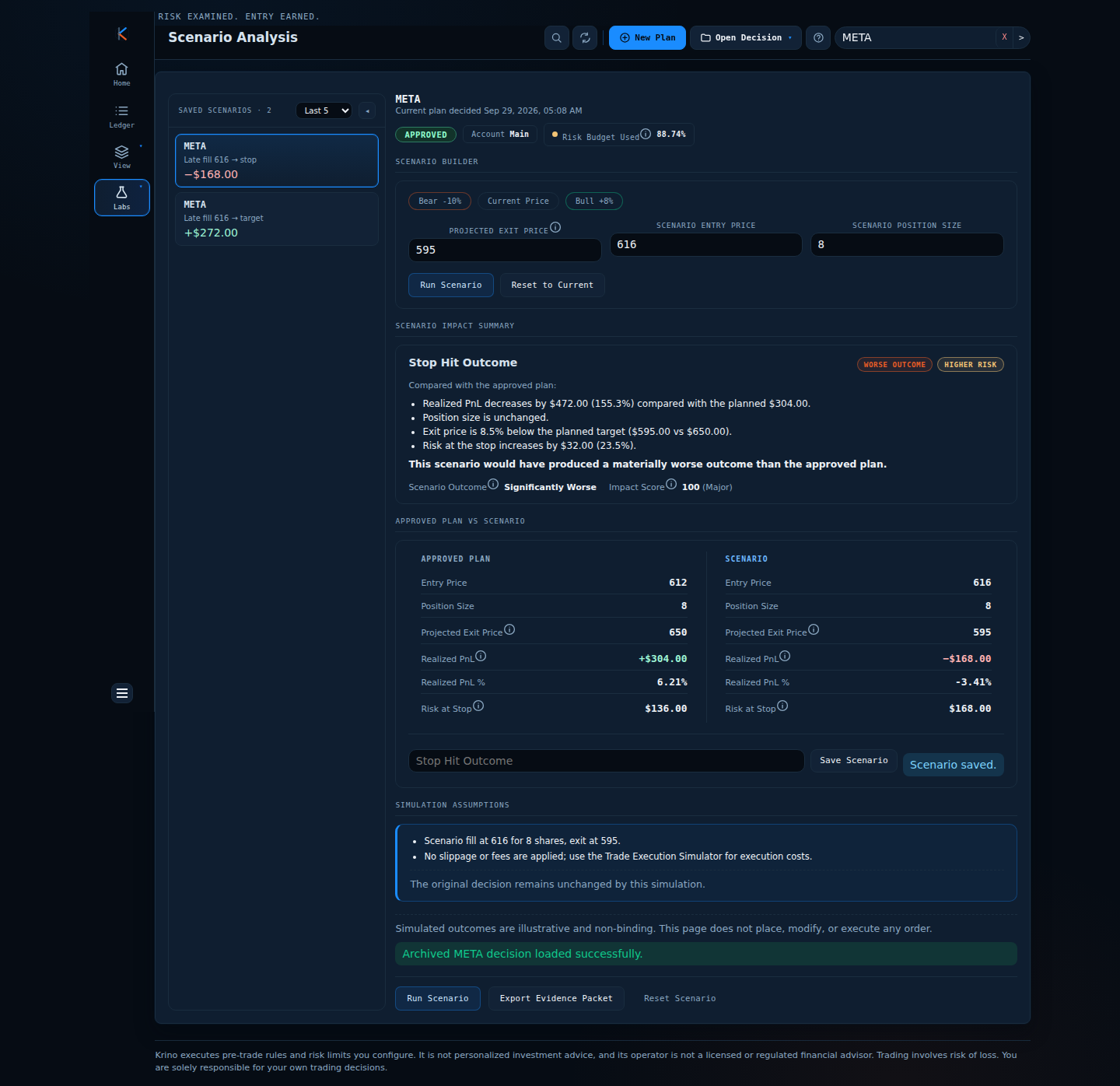
A trader approves a META buy: entry 612, stop 595, target 650, 8 shares. Reward-to-risk 2.24, risk 136, potential profit 304. The rule is a minimum 2.0.
The stock gaps and the market order fills at 616. Four points sounds small, but it changes the risk, the reward and whether the trade still meets the trader’s own rule.
Key concept: stress the inputs you do not control
You control entry rules, stop and size. You do not control fill price, slippage, fees and how long price takes to reach a level. A what-if changes only those inputs and keeps the rest of the plan fixed, so any difference is attributable.
A plan is only as good as its worst acceptable fill. Compute that price before the order, and write it down.
Worked example: the plan that breaks at 616
- Plan: entry 612, stop 595, target 650. Risk per share 17, reward per share 38. R:R = 38 / 17 = 2.24.
- Break-even for the rule: with a minimum of 2.0, the highest acceptable fill is 613.33. Anything above it fails.
- Late fill at 616: risk per share 21, reward per share 34. R:R = 34 / 21 = 1.62, below 2.0.
- Exit at target: +272 instead of +304 (−11%).
- Exit at stop: −168 instead of the approved −136. That is 23.5% more loss than the risk that was approved.
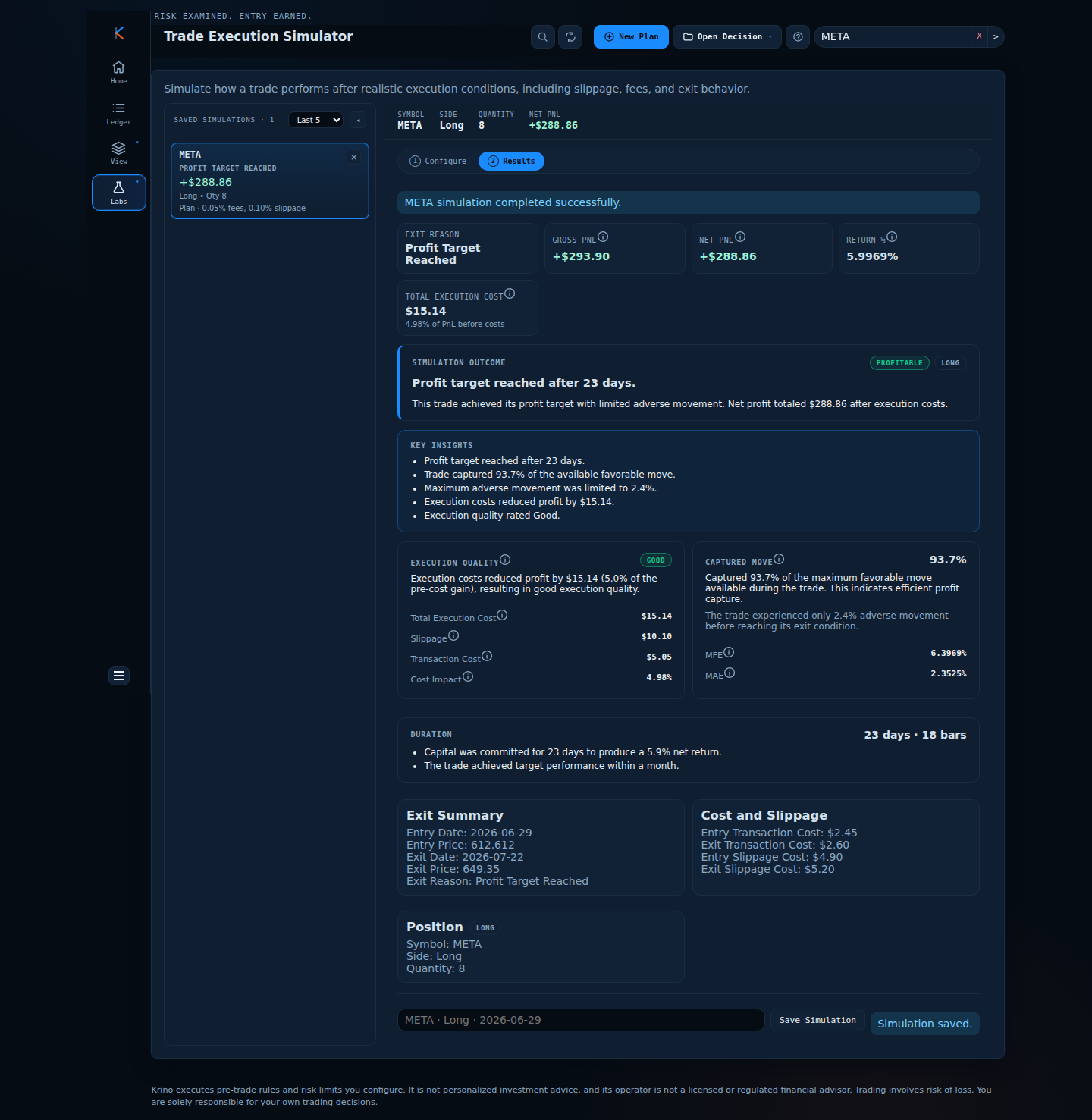
- Add costs: with 0.05% fees and 0.10% slippage the plan still wins at the target, net +288.86 after costs of 15.14. With a late fill at 616 and 0.25% slippage, net is +241.62 and costs are 30.38.
Decision: replace the market entry with a limit entry (an entry at 607.50 gives an R:R of 3.40) or skip the trade.
Stress-testing a plan before committing capital
One saved plan, a realistic cost run in the Trade Execution Simulator, a late fill in Scenario Analysis, and the switch to a limit entry.
Illustrative prices and staged data; captions are added to the recording.
Comparison: three kinds of what-if
| Tool | Question | Inputs you change | Use it for |
|---|---|---|---|
| Scenario analysis | What if I enter or exit at a different price? | Entry, exit, size | Late fills, stop and target outcomes |
| Execution simulation | What do realistic costs and a path through history do to this plan? | Fees, slippage, stop and take levels | Cost drag, excursions, time in trade |
| Backtest | Would this rule have worked in the past? | Strategy and period | Validating a rule, not a single trade |
Common mistakes
- Simulating only the winning case. Always run the stop. It is the number you have to live with.
- Ignoring costs on small positions. A few euros of fees and slippage can erase a thin edge.
- Treating a what-if as a prediction. It is a stress test, not a forecast.
- Not writing down the worst acceptable fill. Without it, you will rationalise any price in the moment.
A framework you can use tomorrow
- Compute your worst acceptable fill from your minimum reward-to-risk.
- Run the plan at that fill, at the target and at the stop.
- Add realistic fees and slippage for the instrument.
- If any case breaks a rule, change the entry type, the size or skip the trade.
- Save the scenarios with the plan so you can compare them with what really happened.
How Krino helps
Krino has two what-if tools. Scenario Analysis lets you set a different entry price, exit price and size for an approved plan and shows the realised P&L, the risk at the stop and a plain-language verdict against the plan. Bear, current and bull presets are one click away.
The Trade Execution Simulator runs the plan through market history with your stop and take levels, fees and slippage, and reports the exit, the duration, the worst dip and the cost drag. Both save results next to the decision; a simulation never modifies the original.
Stress-test a plan before it costs money.
The demo opens the Trade Execution Simulator for an NVDA plan: exit, net P&L, costs and how much of the move it captured. No signup, no email, no card.
Quick start checklist
- Write the highest acceptable fill price on every plan.
- Run the stop-out case every time.
- Include fees and slippage, even small ones.
- Prefer a limit entry when the plan has little room.
- Save the scenarios and compare them after the trade.
The question that actually matters
Instead of asking “what if this works?” ask “at what fill does this plan stop being a plan?” Before your next order, compute that price and decide what you will do if offered a worse one.
Simulate your next trade first.
Run the planned trade through history in the demo, then decide. No signup needed.
Krino executes rules and risk limits you configure. It is not personalized investment advice. Trading involves risk of loss. You are solely responsible for your own trading decisions. The worked examples in this article use illustrative prices and demo data, not a recommendation or real market data.