The daily action queue: a short, ranked to-do list for your book.
Open positions, waiting setups, risk limits and half-finished plans all compete for your attention. A good action queue puts risk first, opportunity second and everything else last.
A trading day produces a stream of small obligations: a stop that is close, a limit order to confirm, a plan that expired overnight, a risk limit that is nearly used. Written down, it is ten items. In your head, it is one vague worry.
This article shows how to turn that into a short, ordered queue. Read one list in the morning, work it top to bottom, and you stop reacting and start deciding.
The problem: everything feels equally urgent
Without an order, traders do the easiest or most exciting thing first, usually a new setup. The more important work (an unactioned stop-out, an account near its risk limit) waits.
The cost: bigger losses, positions held too long, and orders placed after the risk budget was spent.
Key concept: rank by category first, score second
A useful queue is sorted by category before score, because some work always outranks other work:
| 1. Risk protection | Stop hit, risk budget exhausted, portfolio concentration |
| 2. Opportunity capture | A plan ready to act on, or one that needs confirming |
| 3. Watchlist | Ideas to keep an eye on |
Inside each category, order by an action score: a base value for the type of action plus a few modifiers (high risk impact, high portfolio impact, high confidence, strong market alignment). A tie goes to the stronger signal, then the more recent update.
Risk protection before opportunity, always. A great setup is not a reason to leave a broken position unattended.
Worked example: one morning, four rows
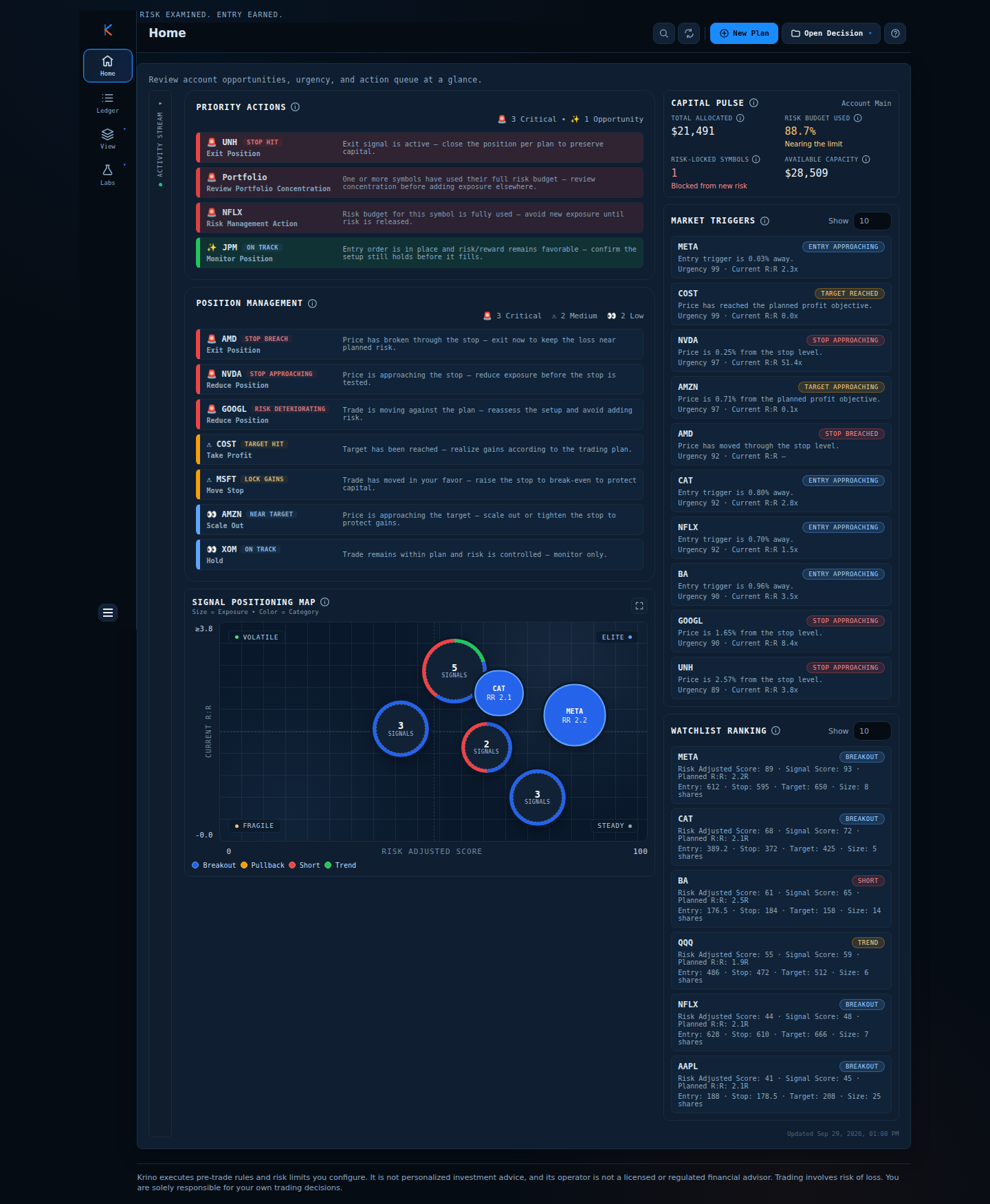
- Situation: the queue shows UNH (Exit Position, stop hit), a Portfolio row (Review Portfolio Concentration), NFLX (Risk Management Action, budget fully used for the symbol) and JPM (Monitor Position, on track).
- Decision: work it in order. Exit UNH per plan. Review concentration before adding exposure anywhere. Hold new NFLX exposure until its risk is released. Leave JPM alone.
- Outcome: three of the four rows protect capital, and none required hunting for a new idea.
Rows also depend on plan status: a draft asks you to review and approve, a working order asks you to confirm the setup before it fills, and an on-track position reads as on track.
From a suggestion on Home to a recorded add
The queue suggests a Scale In on a held MSFT position. The add is planned as its own decision, checked against the symbol’s remaining risk, sized from current exposure and linked to its fills in the ledger.
Illustrative prices and staged data; captions are added to the recording.
Comparison: three ways to run the day
| Approach | How it works | Weakness |
|---|---|---|
| React to the screen | Whatever is flashing | Urgent beats important; risk loses |
| Handwritten to-do list | Your own priorities each morning | Easy to put exciting items first |
| Rule-ranked queue | Category, then action score | Needs rules you trust and keep honest |
Common mistakes
- Starting with new ideas. Clear the queue’s risk items first.
- A queue that never ends. Show the top handful. If everything is critical, nothing is.
- Forgetting portfolio-level actions. The account can be at risk even when no single symbol is.
- Overriding the order for a hunch. If you disagree, change the rule, not the order of the day.
A framework you can use tomorrow
- List every pending action across positions, plans and risk.
- Tag each as protection, opportunity or watchlist.
- Order by tag, then by size of impact on risk or capital.
- Work the top five. Everything else waits for tomorrow.
- At day end, record what you did against the list.
How Krino helps
Priority Actions (previously called the Mission Queue) is the ranked list on Home. It orders rows by category (risk protection, opportunity capture, watchlist), then by action score, then signal score, then recency, and shows the top few. It adds synthetic rows when a symbol is risk-locked, and a portfolio row to review concentration when any lock exists.
Open positions are triaged separately in Position Management, ordered by urgency of protective or profit-taking actions: exit and reduce first, then take profit and move the stop, then monitor.
See a ranked to-do list for a real book.
The demo home screen ranks stop hits, risk locks and opportunities for sample positions. No signup, no email, no card.
Quick start checklist
- One ranked list before the open, not scattered tabs.
- Risk first, opportunity second, watchlist last.
- Show only the top handful.
- Deal with open positions separately from new ideas.
- Close the day by checking the list against what you actually did.
The question that actually matters
Instead of asking “what looks interesting today?” ask “what is the most important thing for my capital right now?” Tomorrow, write your queue before opening a chart and work it in order.
Start each session with the short list.
See what the queue looks like on a sample portfolio. No signup needed.
Krino executes rules and risk limits you configure. It is not personalized investment advice. Trading involves risk of loss. You are solely responsible for your own trading decisions. The worked examples in this article use illustrative prices and demo data, not a recommendation or real market data.